How it works
A photographer's shoot, on your phone.
AgentShot Pro turns the way professional property photographers work into a step-by-step guide. You follow it; the camera handles the technical side.
From front door to portal-ready
No tripod, no camera bag, no waiting for a photographer's diary. The person already at the property shoots it, and the app makes sure they get it right.
Set up your agency
Create your account and add your team. Everyone gets their own login for the app, and you decide who can buy listings.
Shoot room by room
The app plans the shoot from your bedroom and bathroom count and shows where to stand in each room. It checks every photo before you move on.
Get edited photos back
Every photo is professionally edited and sent to you by email on your own download page, in full size for print and web size for the portals.
1. Get the property ready
Before you start, the app runs through a short checklist: open curtains and blinds, turn on the lights, clear the worktops, put away family photos, post and anything personal, and move cars or turn number plates away. Five minutes here does more for the final photos than anything else.
2. Plan the rooms
Enter the address and how many bedrooms and bathrooms there are. The app lists every room to shoot, including the hallway and the outside, and you can shoot them in any order.
3. Follow the room guide
Each room type has its own guide, written by professional property photographers. A simple floor plan shows where to stand for each angle. For most rooms that's two shots: from the doorway looking across, then from the far corner back towards the door. Up to 30 photos per listing.
4. Level, height and stillness
Hold the phone sideways. A live level line turns green when the phone is straight, so walls stay upright. On iPhone a height bar confirms the phone is at navel height, the height professionals use for rooms. When everything is right and the phone is still, the shutter unlocks, or Auto-shoot takes the photo for you.
5. Three exposures every time
Each photo is captured as three frames, darker, middle and brighter, with focus and colour locked. Editing blends them, so windows show the view rather than a white glare and dark corners stay bright. Camera settings are set by professional photographers to get the best results from your phone.
6. Nothing missed
Before you send, the app compares what you shot with the rooms you entered. Entered three bedrooms but shot two? It asks. It never blocks you, it just makes sure nothing is forgotten.
7. Professional editing and delivery
The shoot uploads in the background and goes for professional editing. You get an email with a link to the listing's own download page: every photo in full size for print and web size for Rightmove, Zoopla and OnTheMarket, one at a time or all at once. Need something changed? Ask for a re-edit within 48 hours.
See it in a real room
Lowered to navel height, levelled, held still: three exposures, then the edited photo.
Three exposures. One finished photo.
Editing blends the three frames so the room and the view outside are both right.
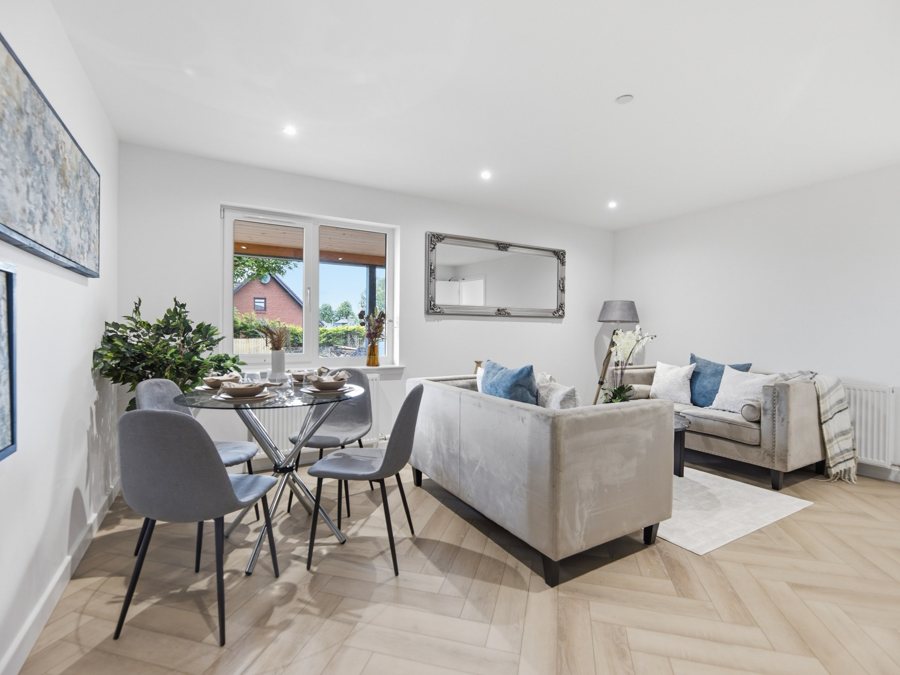
The three exposures here are simulated from the finished photo. Real before-and-after sets from AgentShot Pro shoots will replace them.
See the quality before you pay
Create a free account and take one test photo in the app. We'll edit it professionally and email it back, exactly as we would for a full listing. No card needed.
Shoot your next listing yourself.
Start with a free test photo, or set up your agency in a few minutes. The app is coming soon to the App Store and Google Play.